It’s finished. Now send it.
Quickly host and share your AI-generated work.
Keep it private with a password, know the moment your client opens it, and collect their feedback right on the page — instead of in a five-email thread.
A proposal, a report, a prototype — live at acme-proposal.quickhost.ing in seconds. Your client clicks once, with no account and nothing to download.
The last mile
Where does AI work go after the chat?
Usually nowhere good. It stays as an artifact in the chat, an attachment in an email, or a zip in Slack — places clients can’t open, won’t open, or open once and never find again. The alternative is publishing it to a clean, gated URL of its own.
An artifact in a chat thread
Your client doesn’t have your Claude account, and never will.
final_v3_ACTUAL.pdf
Two megabytes of attachment, and zero idea whether it was ever opened.
A zip in Slack
On their phone it downloads, unzips into nothing, and dies.
Work this good deserves a URL — one your client can open, and one that reports back.
Three doors
How do you publish an AI-generated file?
Three ways, and every one of them takes seconds: drag it onto the dashboard, run one command, or let your agent do it. They all end at the same place — a live address with your access rules already applied — so you have a link to paste before you’ve finished writing the email it’s going in.
Nothing to install, nothing to set up.
Drop in a file or a whole site folder and choose the name yourself — acme-proposal, not violet-crane-42, so the address looks like it was made for them. You leave with the link, a QR code, and a copy button already in hand, because pasting it somewhere is the very next thing you were going to do.
Never leave the terminal you’re already in.
The address prints on its own line, ready to copy. Send the same one again after every revision — your client never has to re-bookmark anything, and they never open a stale version by mistake.
Let your agent send it while you do something else.
Say “publish this and give me the link” and it’s done — gated the way you asked, without you opening a browser. Your agent gets 19 tools and error codes it can actually act on, so it recovers on its own instead of stopping to ask you.
What lands on their screen
What does your client see when they open the link?
Something that looks like you meant it — not a download prompt, and not a zip that dies on a phone. Multi-file sites open exactly as you built them, a PDF in a clean reader with your title on it, markdown as a typeset page, a spreadsheet as a table they can sort, video that streams properly. Even the link unfurls with a real preview in Slack and email, so it looks considered before they’ve clicked.
The interactive mini-app your AI built, on its own subdomain, scripts intact.
A viewer with chrome so minimal it reads like your letterhead. Download button included.
Rendered and typeset. Nobody has to know it started life as report.md.
A sortable table they can actually explore — not a spreadsheet they’ll never open.
Centered and clean, with the raw file one click away.
Streams and scrubs on any device. A walkthrough without the Loom account.
Who gets in
Who can open the link?
Exactly who you decide — and you can change your mind after you’ve sent it. Per project, that’s anyone with the address, anyone with the doorcode, or only the people you named. Put an expiry on it and “quote valid 30 days” stops being a figure of speech. Nothing is indexed by search engines unless you say so.
Public
noindex by default, because a deliverable is sent to someone, not published to the world.Doorcode
Named links
Expiry, revocation, and re-sending — the boring parts of client work, handled.
After you hit send
Did the client even open it?
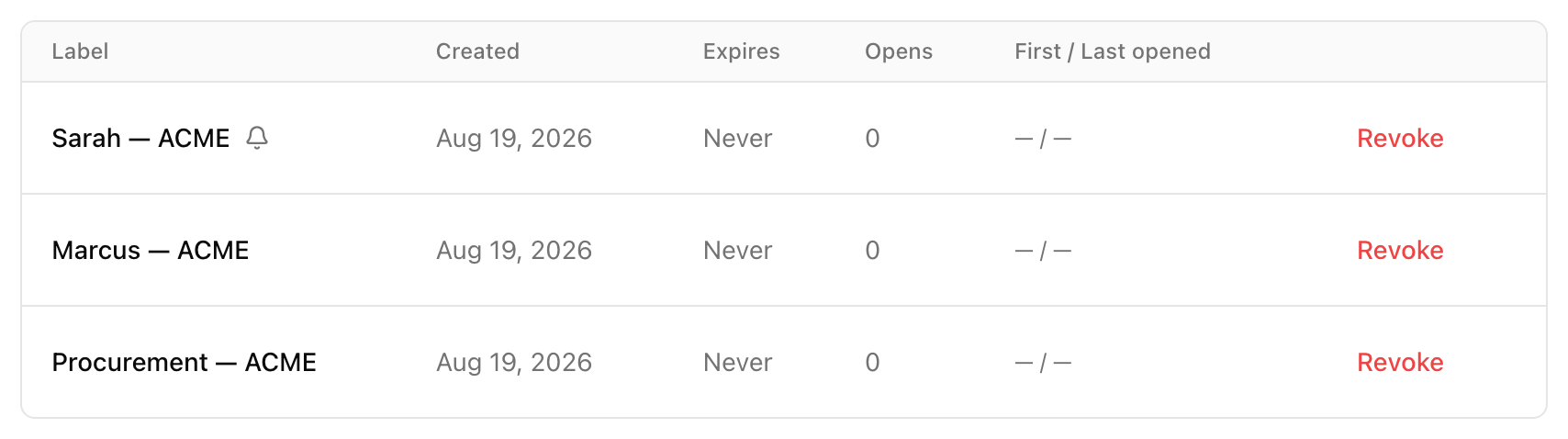
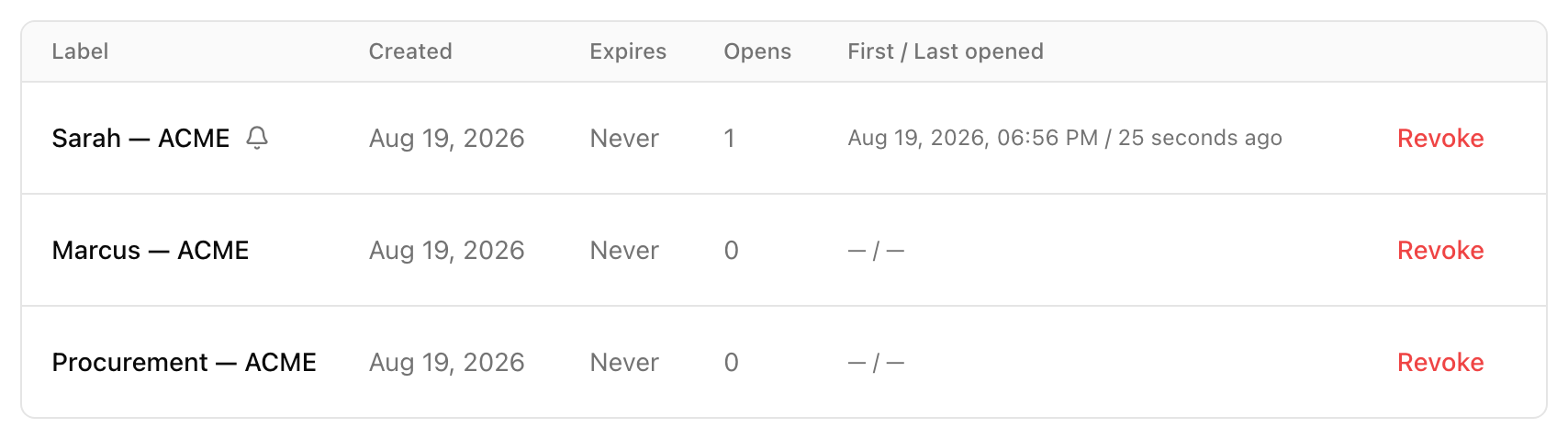
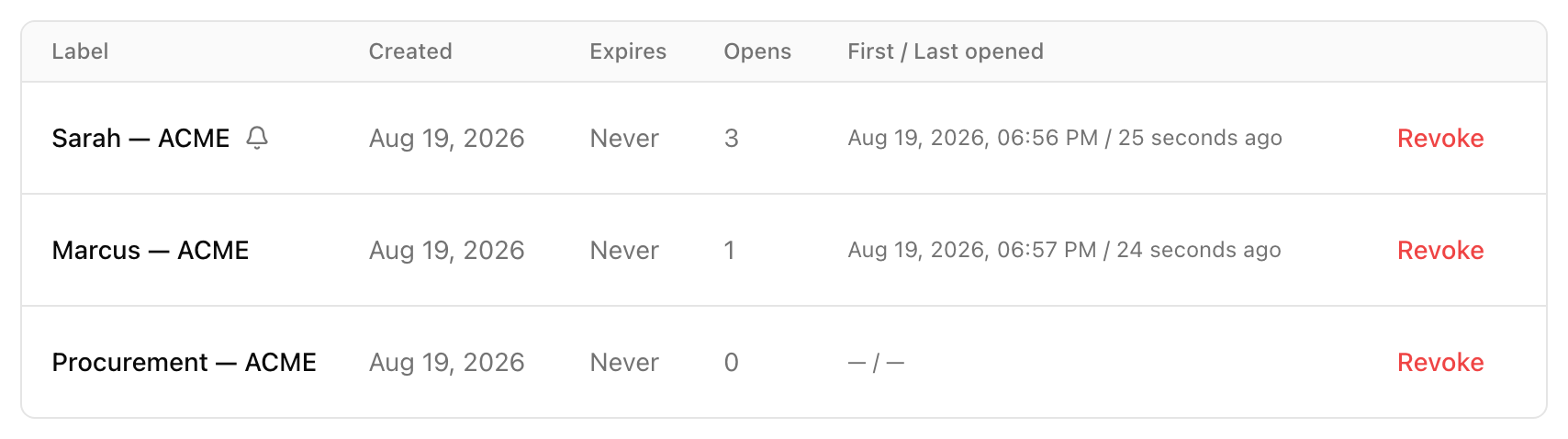
Give each recipient their own named link and you know. Open count, first opened, last opened — per person, not per page. And the first time each link is opened, an email lands in your inbox saying so.
You sent the proposal Thursday at four. By Friday morning the panel reads Sarah — opened 3× and Procurement — not yet.
Monday’s follow-up stops being a guess. “Just checking in” becomes “I saw the team took a look — what did Sarah think of the timeline?”
First open: Sarah — ACME
The email arrives the first time each recipient opens their own link.
No pixel trackers, no script injected into your work, and no cookies set on your client. Here’s how that works →
The loop, closed
What happens when the client wants changes?
They comment directly on the thing — a highlighted sentence, a pin on the page, a PDF page, a moment in a video. Your agent reads that thread, revises the file, and republishes to the same URL. The comment gets resolved and the link never changes.
- 1
The client marks the line
They highlight “delivery in 6 weeks” and write “Can we phase this?” — no account, no sign-up wall.
- 2
Your agent reads it
Comment plus its anchor, over MCP or qh comments --json, through the same interface it published with.
- 3
It revises and republishes
Same URL, new version. Surviving comments re-anchor; anything that can’t be matched is flagged, never silently dropped.
- 4
Resolved
The client refreshes the link they already have. Nobody ever emails final_v4.
The deliverable your AI wrote gets revised by the AI that wrote it — from feedback your client left in their own words, on the exact line they meant.
Where it all lives
Where does all of it live?
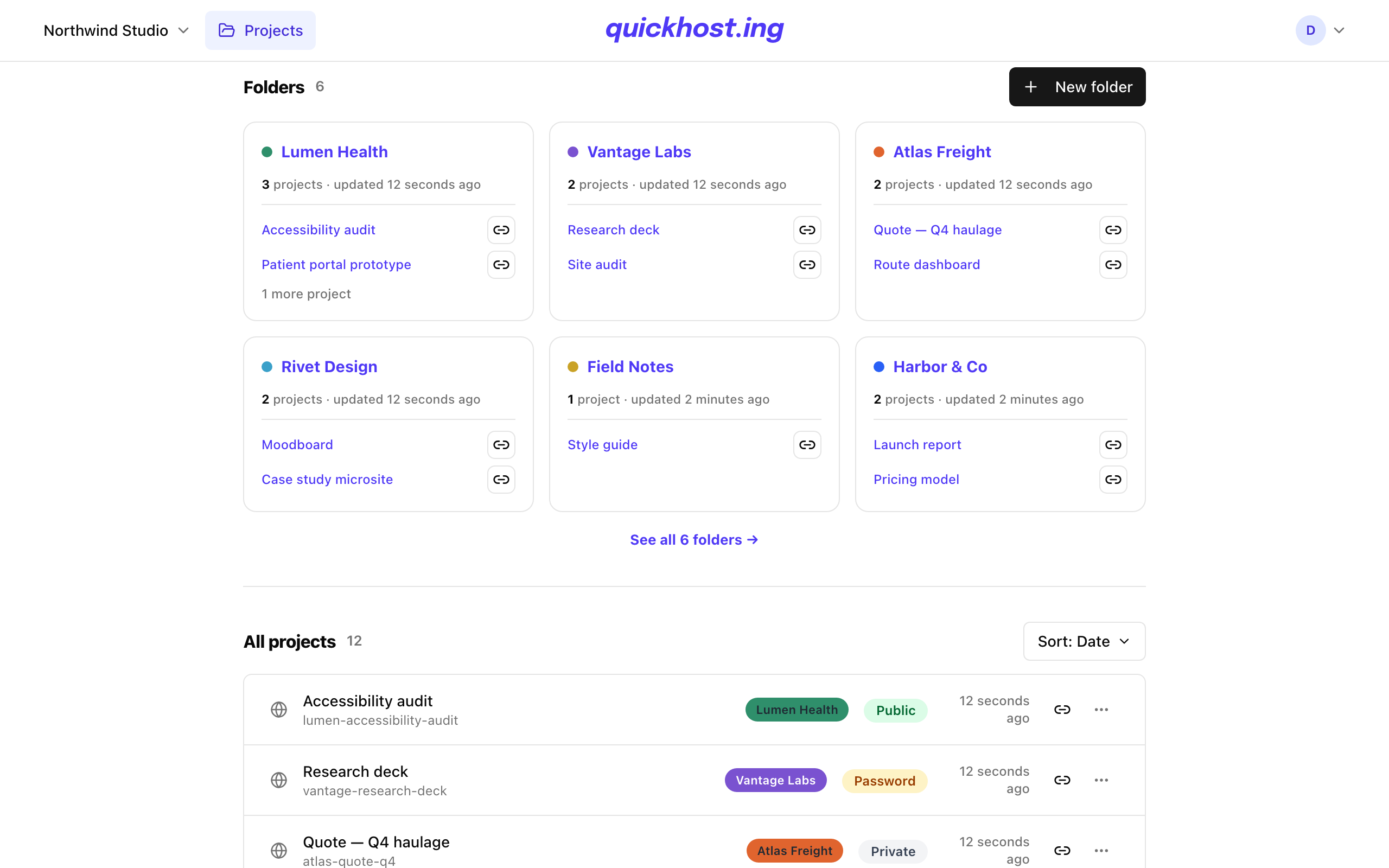
A folder per client, a colour per folder, the newest work on top. Search hits titles, slugs, and folder names at once. Your whole team works in one workspace — so when the renewal call comes around, a client’s entire history is already in one place.
The other side of tracking
How is engagement tracked without tracking your client?
From server logs, not from their browser. Nothing is added to the file you published, no cookies are set on the people who view it, and visitor counts are salted hashes that rotate daily. You can tell a client “there are no trackers in this” and be telling the truth.
Nothing is injected into your work
No analytics script rides along with the file you published. What you uploaded is what your client’s browser receives.
Measured at the server, not in their browser
Counts come from access logs, which is also why raw file downloads and video plays are counted at all — an ad-blocker has nothing to block.
No viewer cookies, and salts that rotate daily
Unique visitors are salted hashes with the salt rotating every day, so the number can never quietly become a list of identified people.
And every project is noindex by default — nothing you publish shows up in a search engine unless you decide it should.
Headless
Can your agent do all of this without you?
That is the intended shape. Everything above works headless: an MCP server with 19 tools, a CLI with --json on every command, and a REST API whose error codes are stable strings an agent can branch on rather than prose it has to interpret.
- MCP
- 19 tools — publish, update, share links, comments, analytics
- CLI
- qh publish · --json on every command · real exit codes
- REST
- PUT one file with a content-type. No multipart ceremony.
- Errors
- slug_taken · quota_exceeded · upload_too_large · project_expired
- Agent docs
- /mcp.md · /llms.txt · /docs.md · /.well-known/agent.md
- Setup
- quickhost.ing/docs/mcp — per-client instructions
- Auth
- Device flow for the CLI, scoped qh_ tokens for everything else
Paste this into your coding agent
Add the QuickHost MCP server, then publish proposal.html as acme-proposal, password-gated, and give me back the URL and the doorcode.The machine-readable docs live at api.quickhost.ing/llms.txt — point your agent there and it can work the rest out itself.
The whole list
What’s included?
All of it, in every plan — the higher tiers buy you more work in flight and more people to do it with, never a feature you were missing. Here is everything, grouped by what it gets you rather than by what it is.
Get it live in seconds
- Drag in a file, a folder, or a zip
- Or publish with one command from your terminal
- Or let your coding agent do it without you
- Name the link yourself — acme-proposal, not violet-crane-42
- Republish as often as you like; the address never changes
- Every version kept, so nothing is overwritten by accident
- No repo, no build step, no config file
It looks finished when they open it
- Multi-file sites served exactly as you built them
- PDFs in a clean reader instead of a download prompt
- Markdown and text typeset as a real page
- Spreadsheets as a sortable table they can explore
- Video that streams and scrubs properly on a phone
- A real preview card when the link is pasted into Slack or email
- Your own preview image and favicon
- Branded pages when a link has expired
Only the people you choose
- Public, password-protected, or private
- A password you can read back and re-send three weeks later
- A separate link for each recipient
- Revoke one person’s link without touching anyone else’s
- An expiry date on any project
- Hidden from search engines unless you decide otherwise
- Nothing anonymous — every link traces back to your workspace
Know where you stand
- Who opened it, when they first did, and how many times since
- An email the first time each recipient opens their link
- Views, unique visitors, and a day-by-day chart
- Downloads and video plays counted too
- No tracking script added to the work you published
- No cookies set on the people who view it
Feedback that never becomes an email thread
- Comments anchored to the exact sentence, pin, PDF page, or moment in a video
- Your client comments without creating an account
- Replies, so a discussion stays in one place
- Restrict commenting to the email addresses you name
- Comments survive a republish; anything that can’t be matched is flagged, never dropped
- Your agent reads the thread, fixes it, and resolves it
Keep a dozen clients straight
- A folder per client, each with its own colour
- Drag a project into a folder, with an undo if you misfire
- Search titles, slugs, and folder names at once
- One shared workspace for the whole team
- Admin and member roles, invitations by email
- A QR code for every link, ready to print
- API tokens you can label and revoke
Everything above is live today. What isn’t, isn’t on this page — here’s what it deliberately doesn’t do →
The honest comparison
Why not just use what you already have?
Often you should. If your AI’s built-in sharing does the job, it’s already in what you pay for and it’s one click — use it. The gap opens when the file is going to a paying client, who needs to open it without signing up for anything: none of these lets you put a password on the interactive thing your AI made, expire it, see which person opened it, and take their comments back — all four, in one place.
Why not just share it from ChatGPT or Claude?
Both can put what they made on the web. ChatGPT Sites gives you traffic totals, your own domain, and — since September — a way to invite named people, who then have to sign in to OpenAI to see it. Claude publishes a public link from chat, though some of its newer sharing asks every viewer to have a Claude account. What neither does — and what client work needs by the second deliverable — is let a client in with a password instead of an account, expire the link, and tell you which person opened it and when.
| What you need | Claude artifact | ChatGPT Sites | quickhost.ing |
|---|---|---|---|
| A multi-file site — CSS, JS, images, sub-pages | NoSingle page; relative links don’t resolve | Yes | Yes |
| PDFs, spreadsheets, images and video, each with its own viewer | No.html, .htm or .md only | No | Yes |
| A password on the link | No | No | Yes |
| Only the people you name — without making them sign up | NoNamed viewers must be in your Claude organisation | PartlyInvited people must sign in to OpenAI | YesA password, or a named link per person |
| An expiry date on the link | No | No | Yes |
| Per-recipient open tracking | No | NoTotals only, not who | YesPlus a first-open email |
| Comments from your client, no account needed | NoOnly signed-in members of your own organisation | No | Yes |
| Traffic analytics | No | Yes | Yes |
| Your own domain | No | Yes | NoNot yet |
| Available without paying | PartlyFree in chat; Pro and above in Claude Code | NoPlus, Pro or a workspace; not yet in the EEA, UK or Switzerland | NoPaid only, on purpose |
Checked 17 September 2026 against Anthropic’s and OpenAI’s own documentation. ChatGPT Sites is in public beta, and Anthropic’s help centre and Claude Code docs disagree about whether a shared link needs an account — so open yours signed out before you send it.
Why not Netlify, Vercel, or GitHub Pages?
Because they were built for shipping products, not delivering documents. They’re excellent at repos, builds, and preview deploys — none of which exist in the job of sending one finished file to one client this afternoon.
| You reach for | Where it breaks for client work | Here |
|---|---|---|
| Netlify Drop | Genuinely good for a quick drop. But the free tier is a credit pool, projects pause when it runs dry, and password protection lives on the Pro plan. | Gating in every plan, and nothing pauses because a meter ran out. |
| Vercel | The Hobby plan is non-commercial by its own rules — “receiving payment to create, update, or host the site” is the example they give. Password protection isn’t available on Hobby, and costs $20 a month per project on Pro. | Client work is the use case here, not an exception to the terms. |
| GitHub Pages | The free plan needs a public repo, there is no access control below Enterprise Cloud, and the terms bar running a business off it. | Private by default, noindex by default, live in seconds, no repo. |
| A document tracker | Tells you who opened a PDF, usually priced per person — and can’t host the interactive thing your AI actually made. | Tracks and hosts. Every file type, one flat price. |
| The email attachment | final_v3, size limits, and no signal whatsoever after you hit send. | One URL, always current, and you can see who opened it. |
Checked 17 September 2026 against each vendor’s own documentation and pricing pages. Prices move; the mechanisms described here have held for years.
Weighing one tool in particular? Read the detailed comparisons — Claude artifacts, tiiny.host, display.dev, Netlify Drop, DocSend, each with pricing, what switching involves, and when to stay where you are.
The other half of the ledger
What this deliberately does not do
Trust cuts both ways, so here is the other side, plainly. Four things are missing on purpose, and each one is the reason something else works.
No server-side code
What you upload is what gets served — static files, verbatim. Your client’s link can’t break at 9pm because a function crashed, because there are no functions.
No build pipeline
Nothing compiles, so nothing fails to compile. The file your AI made is the file your client opens.
No free tier
This is a paid tool for work that carries your name. That’s exactly why there’s no branding badge on your client’s page, no upsell banner over your proposal, and no link that quietly dies because you didn’t log in this month.
No anonymous publishing
Every link traces back to a workspace someone signed into. It’s why a quickhost.ing URL in a client’s inbox isn’t a phishing red flag.
Pricing
What does it cost?
Three flat plans, from $8 a month, with a 7-day trial of Studio. You’re charged for how much client work is in flight — active projects and the people on your team — never for how many people open your links or how often you republish.
Starter
For sharing your own work
$8/month
or $80 a year — two months free
- 1 member
- 10 active projects
- Password and private links on every one of them
- Unlimited named share links, so you see who opened it
- 1 GB storage · 25 MB per upload
- 7 days of analytics history
Studio
Most teamsFor client work
$39/month
or $390 a year — two months free
- 5 members, flat — then $5 each ($50 a year)
- 100 active projects
- 50 versions kept per project, not 3
- 15 GB storage · 500 MB per upload
- 90 days of analytics history
Agency
For a studio running many clients
$79/month
or $790 a year — two months free
- 15 members, flat — then $5 each ($50 a year)
- 500 active projects
- 100 GB storage · 1 GB per upload
- A year of analytics history
- White-label viewer chrome Coming soon
- Audit log Coming soon
In every plan, including the cheapest one
- Public, password and private-link access
- Link expiry and revocation
- Client comments and the agent revision loop
- CLI, MCP server and REST API
- QR codes, link previews and every viewer
- Unlimited viewers and unlimited republishes
Viewer 1 and viewer 1,000 cost the same. Gating is never the upsell — a deliverable that can’t be locked isn’t finished, so password and private links are in the $8 plan too. The higher tiers buy you more work in flight and more people to do it with.
Billing opens soon. Access is invite-only today while checkout is finished — these are the plans it will open with.
FAQ
Questions, answered straight
Everything below is answered in full on this page rather than hidden behind a “contact sales” form. If something you need isn’t here, the answer is probably “not yet” — and it’ll say so.
- What is QuickHost?
- A place to publish the files AI generates — HTML sites, PDFs, markdown, CSV, images, video — as clean, access-controlled links like acme-proposal.quickhost.ing, with per-recipient open tracking and client comments your agent can read and act on.
- How do I share a Claude artifact or a ChatGPT page with a client?
- Download it as a file and drag it onto the dashboard, or let your agent publish it directly over MCP. Either way it is live on its own subdomain in seconds, gated however you choose, and your client needs no account to open it.
- What file types can I publish?
- Multi-file HTML sites as a zip or a folder, single HTML files, PDFs, markdown, plain text, CSV, TSV, JSON, images, and video. Each one gets a viewer built for it, and sites are served exactly as uploaded.
- Can I password-protect a link, or make it expire?
- Yes, on every plan. A project can be public, password-protected with a doorcode you can read back and re-send, or private behind named signed links you revoke individually. Any project can carry an expiry date.
- How do I know if the client opened it?
- Give each recipient their own named link. The dashboard then shows opens per person — count, first opened, last opened — and an email arrives the first time each link is opened.
- Can clients comment without creating an account?
- Yes. They highlight text, drop a pin, or mark a PDF page or a video timestamp, add a name, and comment. No sign-up. You see the thread in the dashboard and your agent sees it over MCP or qh comments --json.
- Can my AI agent use this without me?
- That is the intended shape. There is an MCP server with 19 tools, a CLI with --json on every command, a REST API with stable machine-readable error codes, and agent documentation at /mcp.md (how to connect Claude Code, Codex, Gemini CLI, Cursor and VS Code), /llms.txt, /docs.md and /.well-known/agent.md.
- Does it run backend code or build my project?
- No. Static files only, served exactly as uploaded — no functions, no build pipeline. That is deliberate: nothing compiles, so nothing can break after you have sent the link.
- Is there a free plan?
- No, and there will not be. Plans start at $8 a month with a 7-day trial of Studio. That is why there are no upsell banners on your deliverables, no branding badge on your client’s page, and no link that dies because you forgot to log in. Access is invite-only while billing is being finished.
- Are viewers tracked with cookies or scripts?
- No. Engagement is measured from server access logs: no analytics script is added to your work, no cookies are set on viewers, and unique-visitor counts use salted hashes that rotate daily. Every project is noindex by default.
The next deliverable is already generating.
Signup isn’t open yet — we’re finishing billing and the last of the safeguards. Leave your email and you’ll be among the first in.